Toshiba e-STUDIO 4525AC
- A3 colour
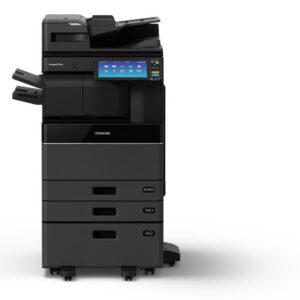
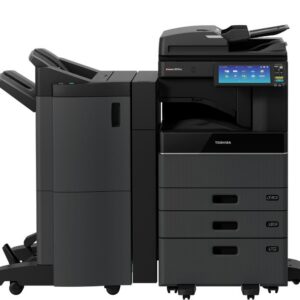
The Toshiba e-STUDIO 4525AC is a high-performance A3 colour multifunction printer designed for medium to large businesses. Offering print and copy speeds of up to 45 pages per minute, it combines professional colour printing, copying and scanning in one efficient office solution.
With automatic duplex printing, a 10.1-inch touchscreen and expandable paper capacity, the e-STUDIO 4525AC is ideal for businesses that require dependable document management and consistent productivity.
Quote on request. Send your details and we'll price this machine for you.
Request a Quote
Description
Toshiba e-STUDIO 4525AC – Professional A3 Colour Printing for Business
The Toshiba e-STUDIO 4525AC is an A3 colour multifunction printer built to support the everyday document demands of modern businesses. Combining fast printing, copying and scanning capabilities, it provides an efficient solution for offices that need professional-quality colour output and reliable performance.
With print and copy speeds of up to 45 pages per minute in A4 and 22 pages per minute in A3, the e-STUDIO 4525AC helps busy teams manage larger print workloads while maintaining productivity.
Efficient multifunction performance
The e-STUDIO 4525AC combines printing, copying and scanning in one machine, helping businesses manage documents without relying on multiple devices. Its 10.1-inch multi-touch colour control panel provides an intuitive interface for accessing everyday functions and customising workflows.
Flexible paper handling
Designed for different business printing requirements, the printer supports paper sizes from A5 to A3, with additional paper sizes and banner printing supported through the bypass tray.
It comes with a standard paper capacity of 1,200 sheets, expandable up to 5,200 sheets with optional paper-feed accessories. Automatic duplex printing also helps reduce paper consumption by printing on both sides of a sheet.
Business connectivity and document management
The Toshiba e-STUDIO 4525AC supports network and USB connectivity, with wireless and mobile printing options available depending on configuration. Its e-BRIDGE Next platform supports integration into modern office environments and document workflows.
A practical solution for growing businesses
Whether used in a corporate office, educational environment or busy workgroup, the Toshiba e-STUDIO 4525AC offers the speed, paper flexibility and multifunction capabilities required for everyday business printing.
Contact Printer Rental to enquire about purchasing the Toshiba e-STUDIO 4525AC. Our team can help you find the right printer solution for your business requirements.
Key features
-
A3 colour multifunction printer
-
Print and copy speeds up to 45 ppm (A4)
-
A3 print and copy speeds up to 22 ppm
-
Print, copy and scan functionality
-
Automatic double-sided printing
-
10.1-inch multi-touch colour control panel
-
Standard paper capacity of 1,200 sheets
-
Expandable paper capacity up to 5,200 sheets
-
Toshiba e-BRIDGE Next technology
-
Network and USB connectivity
-
Optional wireless and mobile printing capabilities
-
Supports a range of business paper sizes and media types
Specifications
| Availability | On Request |
|---|
Common questions on renting a printer:
What’s included in the printer rental cost?
Our printer rental service includes printer hardware, toner replacement, consumables, maintenance, technical support, on-site servicing, repairs, and replacement parts. With our office printer rental, you get all-inclusive printing solutions with no upfront costs, no repair fees, and predictable monthly rental pricing.
How long is the rental period and can it be changed?
We offer flexible printer rental terms, including short-term printer rentals, monthly printer rental, long-term office printer leasing, and event printer hire. You can upgrade, downgrade, extend, or cancel your printer rental agreement as your business printing needs change.
What happens if the printer breaks or needs maintenance?
If your rented printer experiences a fault, our printer maintenance service provides fast response times, on-site technical support, and professional printer repairs. If required, we supply a replacement printer to ensure zero downtime, business continuity, and uninterrupted office printing.
Is there a limit on how many pages I can print per month?
Each printer rental plan includes a recommended monthly print volume based on your office printing requirements. We offer high-volume printer rentals, low-volume office printers, and scalable print packages. Over-usage is billed at a low cost per page, ensuring cost-effective printing and budget control.
Can the printer scan, copy, and connect to our network?
Yes. Our multifunction printer rentals offer printing, scanning, copying, and faxing, with Wi-Fi connectivity, Ethernet networking, mobile printing, cloud printing, and secure document management. Our office printers integrate seamlessly with Windows, Mac, and mobile devices for efficient workplace productivity.