Pantum CM2200FDW

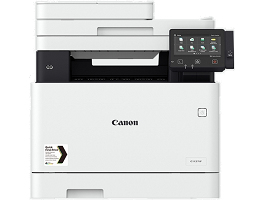
The Pantum CM2200FDW is an A4 colour multifunction printer offering up to 24 ppm printing, with print, copy, scan and fax functions.

Request a Quote

Description

The Pantum CM2200FDW is an A4 colour laser multifunction printer designed for professional office printing. It combines printing, copying, scanning and faxing in one compact machine, making it suitable for businesses and workgroups.

With print speeds of up to 24 pages per minute in A4, automatic duplex printing, a 50-sheet automatic document feeder and USB, network and Wi-Fi connectivity, the CM2200FDW provides flexible everyday office printing. It is a practical Pantum printer rental option for businesses requiring reliable colour document production.

Specifications

Type: A4 Colour Laser MFP
Functions: Print, Copy, Scan, Fax
Print Speed: Up to 24 ppm A4
Print Speed Duplex: Up to 13 spm A4
Paper Size: A4, A5, A6, B5 and other supported formats
ADF: 50 sheets
Standard Paper Capacity: 250 sheets
Output Capacity: 100 sheets
Print Resolution: Up to 4800 Ă— 600 dpi enhanced
Duplex Printing: Automatic
Connectivity: USB 2.0, Gigabit Ethernet & Wi-Fi
Memory: 512 MB
Display: 2.8-inch touchscreen
Recommended Monthly Volume: 600–2,500 pages
Maximum Monthly Duty Cycle: 50,000 pages

FAQs

Is the Pantum CM2200FDW an A4 printer?
Yes. The CM2200FDW is an A4 colour multifunction printer.

How fast does the Pantum CM2200FDW print?
It prints up to 24 pages per minute on A4 in both black and colour.

Does the CM2200FDW print in colour?
Yes. It is a colour laser multifunction printer.

Does the Pantum CM2200FDW have automatic duplex printing?
Yes. It supports automatic two-sided printing.

How many pages can the CM2200FDW handle per month?
Pantum recommends approximately 600–2,500 pages per month, while the maximum monthly duty cycle is 50,000 pages.

Does the CM2200FDW support Wi-Fi?
Yes. It supports Wi-Fi as well as USB and network connectivity.

Can businesses rent the Pantum CM2200FDW?
Yes. The CM2200FDW can be offered as an A4 colour printer rental solution, subject to availability and rental requirements.

Additional information

Period

Daily, Weekly, Monthly

Price per copy

R0.80 Mono, R3.50 Colour

ADF

Yes

Availability

Available to Rent, In Stock

Condition

Refurbished

Connectivity

Ethernet, USB, Wi-Fi

Duplex Printing

Yes

Duplex Scanning

No

Functions

Printer/Scan/Copy/Fax

Ideal For

Medium Business

Manufacturer

Pantum

Pages per Month

2,000 – 5,000

Paper Capacity

351–650 Sheets

Paper Size

A4

Print Speed

21–30 PPM

Print Type

Colour

Printer Type

Multifunction Printer (MFP)

Rental Terms

Monthly Rental, Short Term Rental

Your questions answered

Common questions on renting a printer:

Our printer rental service includes printer hardware, toner replacement, consumables, maintenance, technical support, on-site servicing, repairs, and replacement parts. With our office printer rental, you get all-inclusive printing solutions with no upfront costs, no repair fees, and predictable monthly rental pricing.

We offer flexible printer rental terms, including short-term printer rentals, monthly printer rental, long-term office printer leasing, and event printer hire. You can upgrade, downgrade, extend, or cancel your printer rental agreement as your business printing needs change.

If your rented printer experiences a fault, our printer maintenance service provides fast response times, on-site technical support, and professional printer repairs. If required, we supply a replacement printer to ensure zero downtime, business continuity, and uninterrupted office printing.

Each printer rental plan includes a recommended monthly print volume based on your office printing requirements. We offer high-volume printer rentals, low-volume office printers, and scalable print packages. Over-usage is billed at a low cost per page, ensuring cost-effective printing and budget control.

Yes. Our multifunction printer rentals offer printing, scanning, copying, and faxing, with Wi-Fi connectivity, Ethernet networking, mobile printing, cloud printing, and secure document management. Our office printers integrate seamlessly with Windows, Mac, and mobile devices for efficient workplace productivity.

Need a printer for your office?

Get a quote in three short steps.

Step 1 of 3

Your printer

Your printer

What do you need?

Choose all that apply.

Which type of printer?

Multifunction machines print, copy and scan.

About how many pages a month?