
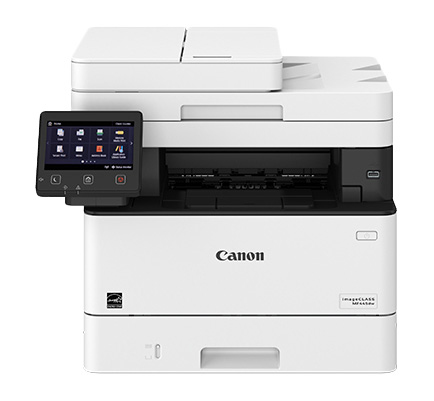
Canon - imageCLASS MF445dw
- A4 mono
- Print/Scan/Copy/Fax
The Canon imageCLASS MF445dw is a compact, high-speed monochrome laser printer with wireless connectivity, duplex printing, and mobile printing support—perfect for small to mid-sized offices needing efficiency and reliability.
Product image courtesy of Open Icecat.
Quote on request. Send your details and we'll price this machine for you.
Request a Quote
Description
- All-in-one functionality: Print, copy, scan, and fax capabilities in a single device.
- Laser printing technology: Provides high-quality prints with sharp text and graphics.
- Duplex printing: Allows automatic double-sided printing, saving paper and time.
- Print speed: Fast printing speeds, typically measured in pages per minute (PPM).
- Mobile printing: Support for mobile printing technologies like AirPrint, Mopria Print, and Canon PRINT Business, enabling printing from smartphones and tablets.
- Wireless connectivity: Built-in Wi-Fi or Ethernet connectivity for easy network sharing.
- Touchscreen display: Intuitive color touchscreen interface for easy navigation and control.
- Document feeder: Automatic document feeder (ADF) for quick and efficient scanning and copying of multiple pages.
- Scanning capabilities: Flatbed scanner or automatic document feeder for scanning documents or photos.
- Fax functionality: Integrated fax machine with features like fax memory, speed dial, and PC faxing.
- Security features: Support for secure printing, user authentication, and data encryption to protect sensitive information.
- Energy efficiency: Energy-saving features such as automatic sleep mode and low power consumption.
- Paper handling: Adjustable paper trays, multi-purpose trays, and options for handling different paper sizes and types.
- Toner cartridge system: Utilizes replaceable toner cartridges for easy maintenance.
Download PDF Here
Specifications
| Cost per copy | R1.00 – Mono |
|---|---|
| Functions | Printer/Scan/Copy/Fax |
| Print Type | Monochrome |
| Manufacturer | Canon |
| Rental Terms | Long Term Rental, Short Term Rental |
| Condition | Refurbished |
| Paper Size | A4 |
Common questions on renting a printer:
What’s included in the printer rental cost?
Our printer rental service includes printer hardware, toner replacement, consumables, maintenance, technical support, on-site servicing, repairs, and replacement parts. With our office printer rental, you get all-inclusive printing solutions with no upfront costs, no repair fees, and predictable monthly rental pricing.
How long is the rental period and can it be changed?
We offer flexible printer rental terms, including short-term printer rentals, monthly printer rental, long-term office printer leasing, and event printer hire. You can upgrade, downgrade, extend, or cancel your printer rental agreement as your business printing needs change.
What happens if the printer breaks or needs maintenance?
If your rented printer experiences a fault, our printer maintenance service provides fast response times, on-site technical support, and professional printer repairs. If required, we supply a replacement printer to ensure zero downtime, business continuity, and uninterrupted office printing.
Is there a limit on how many pages I can print per month?
Each printer rental plan includes a recommended monthly print volume based on your office printing requirements. We offer high-volume printer rentals, low-volume office printers, and scalable print packages. Over-usage is billed at a low cost per page, ensuring cost-effective printing and budget control.
Can the printer scan, copy, and connect to our network?
Yes. Our multifunction printer rentals offer printing, scanning, copying, and faxing, with Wi-Fi connectivity, Ethernet networking, mobile printing, cloud printing, and secure document management. Our office printers integrate seamlessly with Windows, Mac, and mobile devices for efficient workplace productivity.
Short term rental & long term rental
Rent a printer
-
Refurbished

-
Refurbished
-
Refurbished

-
Refurbished
