
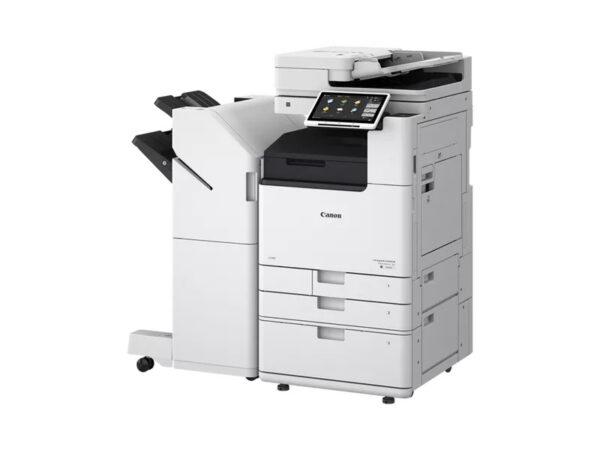
Canon imageRUNNER ADVANCE DX 4845i
- A3 mono
- Print/Scan/Copy/Fax
- 41–50 ppm
The Canon imageRUNNER ADVANCE DX 4845i is a high-performance A3 multifunction printer with 45 ppm printing, copying and scanning. Ideal for busy offices and professional document production.
Product image courtesy of Open Icecat.
Quote on request. Send your details and we'll price this machine for you.
Request a Quote
Description
The Canon imageRUNNER ADVANCE DX 4845i is a reliable A3 monochrome multifunction printer designed for businesses with demanding office printing needs. With speeds of up to 45 pages per minute, it provides efficient printing, copying and scanning for everyday business documents.
Supporting A3 and A4 paper sizes, the Canon DX 4845i is suitable for reports, contracts, presentations and other professional documents. It is a practical Canon printer rental solution for businesses needing reliable, high-volume office printing.
FAQs
What is the Canon imageRUNNER ADVANCE DX 4845i?
It is an A3 monochrome multifunction printer designed for professional office printing, copying and scanning.
How fast does the Canon DX 4845i print?
The printer offers printing speeds of up to 45 pages per minute.
Can the Canon DX 4845i print A3 documents?
Yes. It supports A3 and A4 paper sizes, making it suitable for standard and larger office documents.
Who is the Canon DX 4845i suitable for?
It is ideal for businesses and busy offices requiring reliable, medium to high-volume document printing.
Can I rent the Canon imageRUNNER ADVANCE DX 4845i?
Yes, it can be offered as a business printer rental solution, subject to availability and rental requirements.
Specifications
| Print Type | Monochrome |
|---|---|
| Condition | New |
| ADF | Yes |
| Availability | Available to Rent |
| Connectivity | Ethernet, USB, Wi-Fi |
| Duplex Printing | Yes |
| Duplex Scanning | Yes |
| Functions | Printer/Scan/Copy/Fax |
| Ideal For | Healthcare, Legal, Government, Large Enterprise, Medium Business |
| Manufacturer | Canon |
| Pages per Month | 10,000 – 20,000 |
| Paper Capacity | 1,200+ Sheets |
| Paper Size | A3 |
| Print Speed | 41–50 PPM |
| Printer Type | Multifunction Printer (MFP) |
| Rental Terms | Long Term Rental |
Common questions on renting a printer:
What’s included in the printer rental cost?
Our printer rental service includes printer hardware, toner replacement, consumables, maintenance, technical support, on-site servicing, repairs, and replacement parts. With our office printer rental, you get all-inclusive printing solutions with no upfront costs, no repair fees, and predictable monthly rental pricing.
How long is the rental period and can it be changed?
We offer flexible printer rental terms, including short-term printer rentals, monthly printer rental, long-term office printer leasing, and event printer hire. You can upgrade, downgrade, extend, or cancel your printer rental agreement as your business printing needs change.
What happens if the printer breaks or needs maintenance?
If your rented printer experiences a fault, our printer maintenance service provides fast response times, on-site technical support, and professional printer repairs. If required, we supply a replacement printer to ensure zero downtime, business continuity, and uninterrupted office printing.
Is there a limit on how many pages I can print per month?
Each printer rental plan includes a recommended monthly print volume based on your office printing requirements. We offer high-volume printer rentals, low-volume office printers, and scalable print packages. Over-usage is billed at a low cost per page, ensuring cost-effective printing and budget control.
Can the printer scan, copy, and connect to our network?
Yes. Our multifunction printer rentals offer printing, scanning, copying, and faxing, with Wi-Fi connectivity, Ethernet networking, mobile printing, cloud printing, and secure document management. Our office printers integrate seamlessly with Windows, Mac, and mobile devices for efficient workplace productivity.
Short term rental & long term rental
Rent a printer
-
New
-
Refurbished
-
New

-
Refurbished